Stații de lucru

OS - Windows 9179 Solutii

Reguli si plangeri 11 Solutii

OS - OS X 410 Solutii

Reguli de configurare 12 Solutii

Licentiere 18 Solutii

Securitate 182 Solutii

Copie de rezerva (Backup) 68 Solutii

Antivirus 72 Solutii

Aplicatii specifice 5303 Solutii

Hardware 291 Solutii

How to enable or disable Aero Shake on W11

In Windows 11, “Aero Shake” is a feature that allows you to declutter the desktop by grabbing and shaking a window to minimize all other windows in the background. Then shaking the window back, you can restore all the minimized windows.

In previous versions of the OS, the title bar windows shake feature was enabled by default, but on Windows 11 and later, the feature is disabled by default. However, the Settings app now includes an option to let you decide how to use it.

[mai mult...]
How to find your Wi Fi ‘s password

If you have forgotten your router’s password or it is placed in a hard to reach position, log onto your laptop and follow these simple steps:

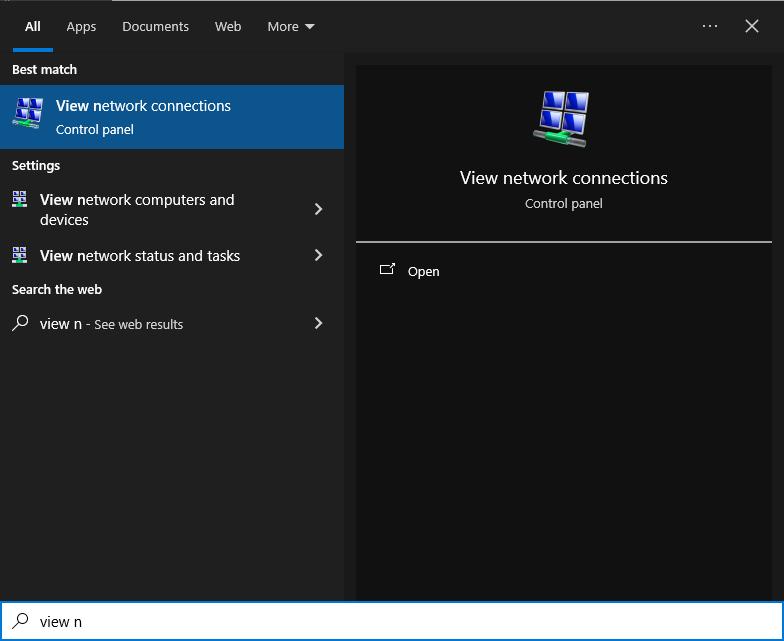
1.Go to Start (bottam left) and search for “View Network Connections” as shown below

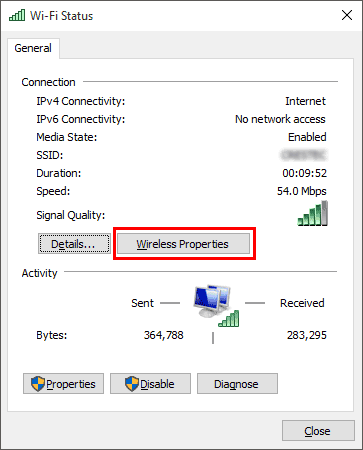
2.Right click on your “Wi Fi” and go to “Status”

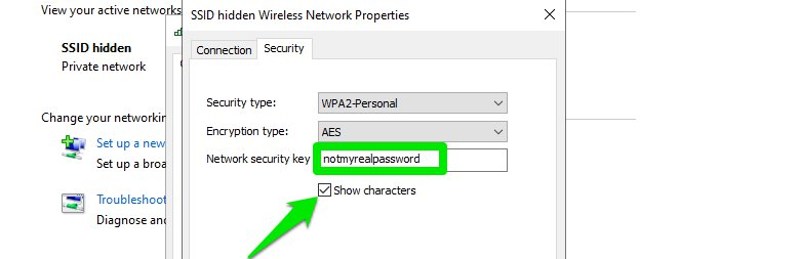
3.Go to Wireless properties and simply tick the “Show password” case

Hope this helps.

[mai mult...]

Khadas VIM1S Review

Alternatives to the mighty Raspberry Pi are numerous, the $299 Edge 2 Pro packs in up to 16GB of LPDDR4X and an octa-core CPU.

For a little less money there is the Khadas VIM 4, a $239 octo-core (2.2GHz Quad core ARM Cortex-A73 and 2.0GHz Quad core Cortex-A53 CPU) based machine with 8GB of LPDDR4X. As you can see, both of these boards retail for far higher prices than the Raspberry Pi 4 (yes they are back in stock now). So how can we get close to the Raspberry Pi price point?

Khadas’ answer is the VIM1S, a lower specification board that comes in at $65. It has a quad-core Arm CPU, 2GB of RAM and onboard 16GB eMMC. the VIM1S is more of something in between a Raspberry Pi 3B+ and Raspberry Pi 4, it lacks Gigabit Ethernet but has onboard eMMC.

Is it a viable Raspberry Pi alternative? Should we go for a slice of this over our favorite Raspberry Pi?

[mai mult...]

Streamlining Windows for Basic Users: Safe Services to Disable

In the Windows operating system, there are numerous background services that provide various functionalities. However, not all of these services are essential for basic users, and disabling or adjusting some of them can lead to improved system performance and resource efficiency. It’s crucial to exercise caution when disabling services, as some may be necessary for specific applications or the overall security and functionality of the system. In this article, we will explore several Windows services that basic users may consider disabling to streamline their computing experience.

  1. Print Spooler: This service manages print jobs in the print queue. If you rarely or never use a physical printer, disabling this service can save system resources.
  2. Windows Search: Responsible for indexing files to enable rapid file searches, this service may be disabled if you don’t frequently use the built-in search feature or have alternative methods of searching.
  3. Windows Update: While it’s crucial to keep your system up to date for security reasons, advanced users who prefer to manually manage updates may choose to disable the Windows Update service. However, this approach requires careful monitoring and manual updating to ensure system security.
  4. Windows Firewall: If you use a third-party firewall and don’t require the Windows Firewall, you can disable it. Maintaining an active firewall for security is generally recommended.
  5. Windows Defender: Basic users who opt for third-party antivirus solutions may choose to disable Windows Defender. Ensure you have a reliable alternative antivirus program in place before doing so.
  6. Windows Error Reporting: This service collects and sends error information to Microsoft. Disabling it can enhance privacy but may limit your ability to receive support and solutions for system issues.
  7. Superfetch (SysMain): Superfetch preloads frequently used applications into memory for faster startup. While this service can be beneficial, basic users with ample RAM may not notice significant performance improvements. Disabling it could free up system resources.
  8. Connected User Experiences and Telemetry: This service sends usage and performance data to Microsoft. Disabling it can enhance privacy but may limit the effectiveness of Windows diagnostics and improvements.
  9. Before disabling any Windows service, it’s essential to conduct thorough research and consider your specific needs. Disabling certain services may impact system stability or the functionality of specific applications. Additionally, it’s advisable to create backups of important data and restore points to revert changes if necessary.
[mai mult...]