How to disable conversation view in Gmail
If you want to see each reply individually, you’ll need to switch this off.
[mai mult...]
Soluții pentru problemele tale IT

If you want to see each reply individually, you’ll need to switch this off.
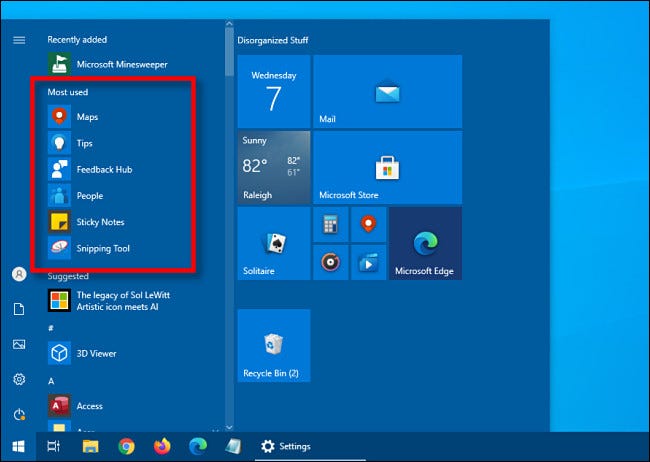
[mai mult...]In timp ce utilizati Windows 10 este posibil sa aveti o lista de aplicatii ,,cele mai utlizate’’ in meniul Start. Indiferent daca doriti sa simplificati meniul Start sau sa ascundeti lista din motive de confindetialitate, ascunderea listei este posibila.
Iata cu puteti proceda:
Daca doriti sa eliminati lista celor mai utilizate aplicatii din meniul Start va trebui sa accesati setarile Windows:
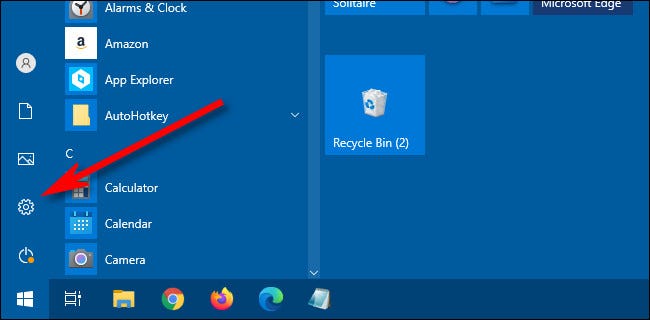
Mai intai apasati pe Start si intrati in Setari (Settings)
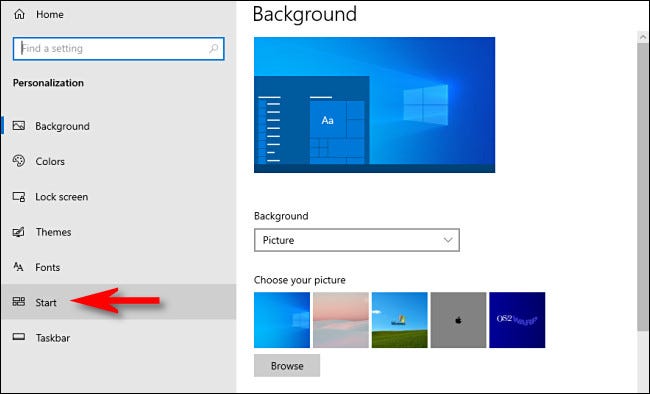
In Settings selectati ,,Personalization’’

In Personalization, faceti click pe “Start”
In Start Settings debifati “Show Most Used Apps” (aceasta trebuie sa fie pe off)
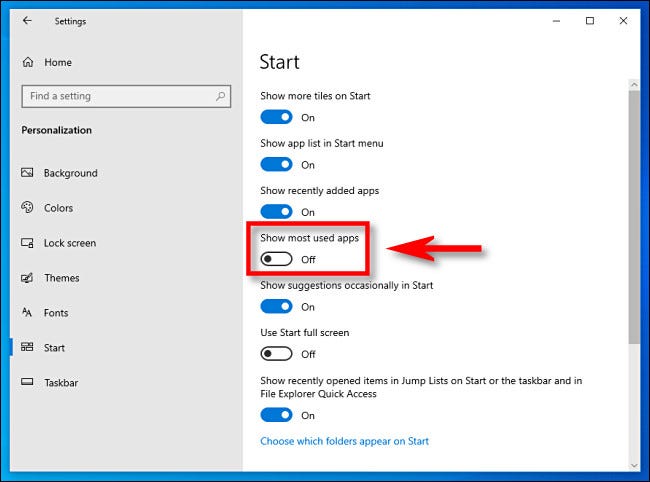
De acum nu vor mai aparea aplicatiile cele mai utlizate in meniul Start.
[mai mult...]Important:
– cu exceptia Emergency Utils, celelalte vor restaura setarile numai dupa ce calculatorul fost in prealabil devirusat. Altfel nu vor avea nici un efect.
– Exceptand asocierea fisierelor care este doar ptr XP, celelalte scripturi pot merge si in Vista.
Restore all – Restaureaza Task Managerul, Regedit si Command Prompt.
 Restore_all.zip 393bytes 599 downloads
Restore Exe – Restaureaza asocierea executabilelor atunci cand in urma unei virusari nu mai pot fi deschise ( apare intrebarea “cu ce program doriti sa deschideti fisierul” ). Sunt doua fisiere – incercati intai cu cel mic – Exefile. Daca nu rezolva, folositi Exefix.
Exefix.zip 1.78K 236 downloads
Restore Associations – Restaureaza asocierea fisierelor in XP.
xp_fileassoc.zip 2.1K 141 downloads
Restore Task Manager – Restaureaza task managerul.
xp_taskmgrenab.zip 5.22K 161 downloads
Emergency utils – Creaza copii functionale ptr Task Manager, Regedit si MsConfig.
Util in cazul in care celelalte metode de restaurare nu sunt eficiente.
xp_emergencyutil.zip 7.69K 119 downloads
Ultimele 3 fisiere – Copyright Doug Knox – http://www.dougknox.com/index.html
Nota – unele programe sau scripturi pot fi identificate ca malware de unii antivirusi.
Important: Inainte de a rula programe de dezinfectare este recomandat sa faceti urmatoarele:
– Updatati aceste programe la zi.
– Dezactivati System Restore.
– Stergeti toate fisierele Temporare. Le gasiti in C:\Windows\Temp si in C:\Documents and Settings\ *user* \Local Settings\Temp. Unde *user* este numele utilizatorului. Este indicat sa faceti acest lucru din Safe Mode.
Inserting a Section Break in a Word document gives you a number of ways to split up large walls of text. This feature is useful not just for breaking up text by pages but also for multi-column layouts.
[mai mult...]If you use Windows 10 with a machine with a built-in camera or fingerprint reader, you may encounter the term “Windows Hello” while setting up sign-in methods. But what does it mean? Let’s find out.
First announced in 2015, “Windows Hello” is Microsoft’s fancy name for Windows 10’s non-password login security options. Several of those login options are biometric, which means that they use an aspect of your body for identity verification. That includes scanning your face or fingerprint using methods similar to Apple’s Face ID and Touch ID to gain access to your Windows account. Windows Hello also allows using a PIN (personal identification number) as an alternative to a password or for times when biometric login methods fail.
[mai mult...]If perfect spelling is not your area of expertise, professional-looking emails can be something of a minefield. Nobody wants their communications to have spelling errors left in, so let Microsoft Outlook help by automatically spellchecking emails before they’re sent.
The best way to deal with spelling errors in an email is not to make them in the first place, and toward that end, Outlook can help. The Microsoft Outlook client has a setting that forces spellcheck to take place after you click the “Send” button. If no errors are found, the email is sent like normal. If a spelling error is found, Outlook gives you the option to correct it before the email is sent.
[mai mult...]