In ecranul de logare nu apare introducerea parolei
Apare user-ul dar nu apare introducerea parolei.
[mai mult...]
Soluții pentru problemele tale IT

Apare user-ul dar nu apare introducerea parolei.
[mai mult...]Network Computers Are Not Showing Up in Windows 10
[mai mult...]După actualizarea computerului la Windows 10 Creators Update, s-ar putea să descoperiți că cea mai populară scurtătura de captură a ecranului OneNote (Win + Shift + S) nu mai funcționează. Apăsați tasta rapidă Win + Shift + S pentru a deschide instrumentul Snipping încorporat în timp ce apăsați Win + S va începe Căutarea Cortana, astfel încât nu puteți utiliza o comandă rapidă de la tastatură pentru a introduce un decupaj de ecran în paginile OneNote.
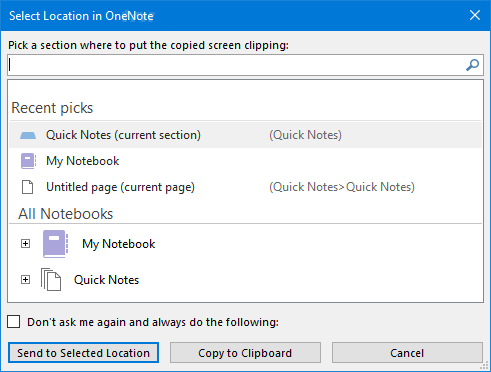
Pentru a remedia aceste conflicte de taste rapide, trebuie să schimbați tasta rapidă de decupare a ecranului OneNote sau să dezactivați tasta rapidă Win + S globală în Windows 10.
[mai mult...]Când încercați să rulați un program cu privilegii de admin, un prompt UAC vă va cere permisiunea de a continua. Există însă anumite activități programate sau aplicații de fundal care pot rula ca admin fără a solicita UAC. În acest tutorial vă voi arăta o metodă simplă pentru a verifica dacă un proces rulează ca administrator în Windows 10.
[mai mult...]If you need to assign a drive letter to a local folder, follow the steps listed bellow.
Open Registry Editor by typing regedit at the Start menu, and navigate to
HKEY_LOCAL_MACHINE\SYSTEM\CurrentControlSet\Control\Session Manager\DOS Devices
Here, you have to create a new entry by right click-ing in a empty space and choosing String Value.
In the Name field, type the drive letter which you want to assign to the folder, and in the Value Data field type “\??\path to the folder”. You nave to restart the PC in order to see the mapped drive.
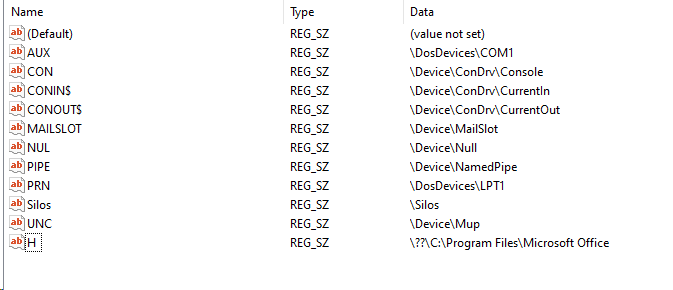
As you can see in the image below, I’ve assign the drive letter H to the Microsoft Office folder.
[mai mult...]
Scanner not working is a common issue in Windows 10, especially in new Windows 10. If your scanner doesn’t work in Windows 10, don’t worry. You’re not a lone. Many Windows 10 users have reported this issue. You can fix the problem with one of the solutions below.
There are three solutions you can try to fix the problem. You may not have to try them all. Just try them one by one until you find the one that works for you.
[mai mult...]