
OS - Windows

Depanare VPN 4 Solutii

instalare printer 50 Solutii

Optimizare pc 50 Solutii

Optimizare PC 103 Solutii

Scanare cu malwarebyte 4 Solutii

shareuire si mapare 15 Solutii

adaugare la domeniu 5 Solutii

Migrare profil 9 Solutii

Instalare/reinnoire certificate 2 Solutii

Personalizare sistem operare 274 Solutii

Configureaza si verifica setarile de boot 11 Solutii

Transfer de date 21 Solutii

Configurare OS 109 Solutii

Reparare OS 47 Solutii

Punct de restaurare OS 8 Solutii

Windows Event Viewer 6 Solutii

Reinstalare/reconfigurare VPN 8 Solutii

Optimizare client e-mail 12 Solutii

Optimizare PC 30 Solutii

Optimizare PC 20 Solutii

Reinstalare / Reconfigurare VPN 6 Solutii

Reinstalare OS 32 Solutii

Reparare sistem de operare 45 Solutii

Programare sistem operare 12 Solutii

Puncte de restaurare sistem de operare 14 Solutii

Instalare imprimanta 44 Solutii

Mapare si partajare 13 Solutii

Modificari firewall 12 Solutii

Migrare profil 8 Solutii

Transferuri de date 33 Solutii

Upgrade sistem operare 12 Solutii

Windows Event Viewer 7 Solutii

Verificare HDD 32 Solutii

Spatiu partitie 31 Solutii

Scanare cu MalwareBytes 5 Solutii

Setari servicii sistem operare 43 Solutii

Setari retea sistem operare 25 Solutii

Setari partitii 19 Solutii

Actualizare sistem operare 15 Solutii

Clonare HDD 11 Solutii

Compatibilitate program 13 Solutii

Instalare / Reinnoire Certificate 6 Solutii

Configurare si verificare setari de BOOT 15 Solutii

Configurare Sistem de operare 1450 Solutii

Identificare DLL-uri lipsa 2 Solutii

Depanare 1051 Solutii

Editarea politicilor de grup ale sistemului de operare 13 Solutii

Drivere 50 Solutii

Cum sa rezolvi codul de eroare 0x801c001d

Daca sunteti conectat la domeniu si primiti eroarea The domain is unavailable in momentul in care doriti sa accesati resurse interne sau sa folositi utilitare din Administrative Tools, este posibil ca dispozitivul de pe care incercati sa va conectati nu comunica cu serverul AD.
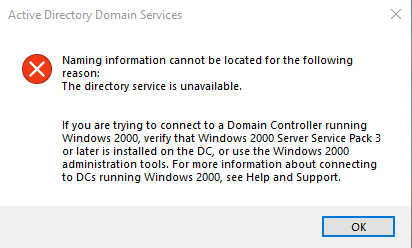
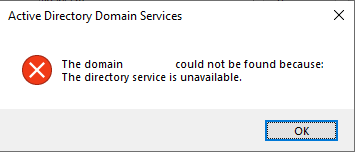
Pentru a rezolva aceasta problema, deschideti Regedit si mergeti la HKEY_LOCAL_MACHINE\SOFTWARE\Policies\Microsoft\Windows\WorkplaceJoin si creati o noua intrare DWORD 32Bit cu numele autoWorkplaceJoin si valoarea 0. Dupa ce ati efectuat aceasta modificare, restartati dispozitivul si totul ar trebui sa revina la normal.

[mai mult...]

How HTTP/3 and QUIC Will Speed Up Your Web Browsing

A global map featuring network-style connections focused on North America.
HTTP/3 is becoming more widespread. Cloudflare is now supporting HTTP/3, which is already part of Chrome Canary and will be added to Firefox Nightly soon. This new standard will make your web browsing faster and more secure.

Here’s the short explanation: Web browsers, web servers, and other critical pieces of web infrastructure are getting support for a new standard named HTTP/3, which uses QUIC. This is a more modern version of HTTP, which web browsers use to communicate with web servers and send data back and forth.

HTTP/3 has been rewritten to send data more quickly with better resistance to errors. It has built-in encryption, too. That means more speed and security. It’s not just data transfer speed, either: HTTP/3 should reduce latency as well, meaning websites will start loading more quickly after you click or tap a link.

The average person never needs to know about HTTP/3 and QUIC. People who run websites and develop web software have some work to do, but it’s all going to be transparent to the average person. One day, your web browser and the websites you use will start communicating over HTTP/3 instead, and the web will get better and better as more sites opt to use HTTP/3.

From HTTP/1 to HTTP/2

HTTP shown in Google Chrome's address bar.

The original version of HTTP uses the Transmission Control Protocol (TCP.) First described in 1974, TCP was never designed with the speed and responsiveness of today’s web in mind.  Google tried to fix many of TCP’s problems with a new protocol named SPDY, which informed HTTP/2.

HTTP/2 arrived in most major browsers by the end of 2015, adding features like data compression and pipelining of multiple requests over a single TCP connection to speed things up.

As of September 2019, W3Techs estimates that HTTP/2 is now being used by 41% of websites.

What Are HTTP/3 and QUIC?

HTTP/3 is more of a rewrite of the HTTP protocol. Instead of using TCP, HTTP/3 uses Google’s QUIC protocol. HTTP/3 was initially known as HTTP-over-QUIC. HTTP/3 also includes TLS 1.3 encryption, so there’s no need for a separate HTTPS that bolts security onto the protocol, as there is today.

QUIC originally stood for “Quick UDP Internet Connections.” This protocol is designed to be faster with lower latency than TCP. QUIC offers less overhead when establishing a connection and quicker data transfers over the connection. Unlike TCP, an error like a piece of data that gets lost along the way won’t cause the connection to stop and wait for the problem to be fixed. QUIC will keep transferring other data while the issue is being resolved.

In fact, QUIC was added to Google Chrome back in 2013. Chrome uses it when communicating with Google services and some other websites like Facebook, and it’s available to Android applications. But QUIC isn’t a standard integrated into other web browsers. With HTTP/3 the technology is coming in a standard way to other browsers, too.

In summary: HTTP/3 is a newer, better, faster protocol. It’s a more modern solution that should deliver improved security and speed to the web.

They’re Coming to a Web Browser Near You

HTTP/3 was added to the bleeding-edge Canary version of Google Chrome in September 2019, hidden behind a command-line flag. Launching Chrome Canary with the --enable-quic --quic-version=h3-23  command-line arguments will enable HTTP/3.

Mozilla announced it’s working on adding HTTP/3 to an experimental version of Firefox Nightly this fall. The new Chromium-based version of Microsoft Edge will inherit Google’s HTTP/3 work for Chrome, as will other Chromium-based browsers like Opera. We would expect Apple to jump on board with HTTP/3 in Safari at some point, too.

Cloudflare has even announced that it’s making HTTP/3 adoption easier for sites that use its content delivery network. Cloudflare customers will soon be able just to flip a switch and enable “HTTP/3 (with QUIC)” for their sites. That should hopefully help boost HTTP/3 adoption by making it easier for websites to enable once browsers get HTTP/3 stable and enabled for everyone.

HTTP/3 is coming to other software, too—for example, the Nginx web server is working on HTTP/3 support for Nginx version 1.17.

We’re in the early stages of implementation. Cloudflare says it will “continue working alongside other organizations, including Google and Mozilla, to finalize the QUIC and HTTP/3 standards and encourage broad adoption.” In other words, not only is the software not final yet—the standard itself may see some changes. There’s a lot of work to be done before this is enabled by default in modern browsers and automatically used.

More Technical Details

Want to know more? Check out Cloudflare’s in-depth look at HTTP/3 or dig through the draft HTTP/3 standard for the real tech specs.

[mai mult...]

How DNS Over HTTPS (DoH) Will Boost Privacy Online

Electric blue lock icon in a circle.
Anci Valiart/Shutterstock.com

Companies like Microsoft, Google, and Mozilla are pushing forward with DNS over HTTPS (DoH). This technology will encrypt DNS lookups, improving online privacy and security. But it’s controversial: Comcast is lobbying against it. Here’s what you need to know.

What Is DNS Over HTTPS?

The web has been pushing towards encrypting everything by default. At this point, most of the websites you access are likely using HTTPS encryption. Modern web browsers like Chrome now mark any sites using standard HTTP as “not secure.” HTTP/3, the new version of the HTTP protocol, has encryption baked in.

This encryption ensures that no one can tamper with a web page while you’re viewing it or snoop on what you’re doing online. For example, if you connect to Wikipedia.org, the network operator—whether that’s a business’s public Wi-Fi hotspot or your ISP—can only see that you’re connected to wikipedia.org. They can’t see which article you’re reading, and they can’t modify a Wikipedia article in transit.

But, in the push towards encryption, DNS has been left behind. The domain name system makes it possible to connect to websites through their domain names rather than by using numerical IP addresses. You type a domain name like google.com, and your system will contact its configured DNS server to get the IP address associated with google.com. It will then connect to that IP address.

Performing a DNS lookup with the nslookup command on Windows 10.

Until now, these DNS lookups haven’t been encrypted. When you connect to a website, your system fires off a request saying you’re looking for the IP address associated with that domain. Anyone in between—possibly your ISP, but perhaps also just a public Wi-Fi hotspot logging traffic—could log which domains you’re connecting to.

DNS over HTTPS closes this oversight. When DNS over HTTPS, your system will make a secure, encrypted connection to your DNS server and transfer the request and response over that connection. Anyone in between won’t be able to see which domain names you’re looking up or tamper with the response.

Today, most people use the DNS servers provided by their internet service provider. However, there are many third-party DNS servers like Cloudflare’s 1.1.1.1Google Public DNS, and OpenDNS. These third-party providers are among the first to enable server-side support for DNS over HTTPS. To use DNS over HTTPS, you’ll need both a DNS server and a client (like a web browser or operating system) that supports it.

Google and Mozilla are already testing DNS over HTTPS in Google Chrome and Mozilla Firefox. On November 17, 2019, Microsoft announced it would be adopting DNS over HTTPS in the Windows networking stack. This will ensure every application on Windows will get the benefits of DNS over HTTPS without being explicitly coded to support it.

Google says it will enable DoH by default for 1% of users starting in Chrome 79, expected for release on December 10, 2019. When that version is released, you’ll also be able to go to chrome://flags/#dns-over-https  to enable it.

Enabling secure DNS lookups via a Google Chrome flag.

Mozilla says it will enable DNS over HTTPS for everyone in 2019. In the current stable version of Firefox today, you can head to menu > Options > General, scroll down, and click “Settings” under Network Settings to find this option. Activate “Enable DNS over HTTPS.”

Enabling DNS over HTTPS in Mozilla Firefox's network settings.

Apple hasn’t yet commented on plans for DNS over HTTPS, but we expected the company to follow and implement support in iOS and macOS along with the rest of the industry.y

It’s not enabled by default for everyone yet, but DNS over HTTPS should make using the internet more private and secure once it’s finished.

Why Is Comcast Lobbying Against It?

This doesn’t sound very controversial so far, but it is. Comcast has apparently been lobbying congress to stop Google from rolling out DNS over HTTPS.

In a presentation presented to lawmakers and obtained by Motherboard, Comcast argues that Google is pursuing “unilateral plans” (“along with Mozilla”) to activate DoH and “[centralize] a majority of worldwide DNS data with Google,” which would “mark a fundamental shift in the decentralized nature of the Internet’s architecture.”

Much of this is, quite frankly, false. Mozilla’s Marshell Erwin told Motherboard that “the slides overall are extremely misleading and inaccurate.” In a blog post, Chrome product manager Kenji Beaheux points out that Google Chrome will not be forcing anyone to change their DNS provider. Chrome will obey the system’s current DNS provider—if it doesn’t support DNS over HTTPS, Chrome won’t use DNS over HTTPS.

And, in the time since, Microsoft has announced plans to support DoH at the Windows operating system level. With Microsoft, Google, and Mozilla embracing it, this is hardly a “unilateral” scheme from Google.

Some have theorized that Comcast doesn’t like DoH because it can no longer collect DNS lookup data. However, Comcast has promised it isn’t spying on your DNS lookups. The company insists it supports encrypted DNS but wants a “collaborative, industry-wide solution” rather than “unilateral action.” Comcast’s messaging is messy—its arguments against DNS over HTTPS were clearly meant for lawmakers’ eyes, not the public’s.

How Will DNS Over HTTPS Work?

With Comcast’s strange objections aside, let’s take a look at how DNS over HTTPS will actually work. When DoH support goes live in Chrome, Chrome will use DNS over HTTPS only if the system’s current DNS server supports it.

In other words, if you have Comcast as an internet service provider and Comcast refuses to support DoH, Chrome will work as it does today without encrypting your DNS lookups. If you have another DNS server configured—perhaps you’ve chosen Cloudflare DNS, Google Public DNS, or OpenDNS, or maybe your ISP’s DNS servers do support DoH—Chrome will use encryption to talk to your current DNS server, automatically “upgrading” the connection. Users might choose to switch away from DNS providers that don’t offer DoH—like Comcast’s—but Chrome won’t automatically do this.

This also means that any content-filtering solutions that use DNS won’t be interrupted. If you use OpenDNS and configure certain websites to be blocked, Chrome will leave OpenDNS as your default DNS server, and nothing will change.

Firefox works a bit differently. Mozilla has chosen to go with Cloudflare as Firefox’s encrypted DNS provider in the US. Even if you have a different DNS server configured, Firefox will send your DNS requests to Cloudflare’s 1.1.1.1 DNS server. Firefox will let you disable this or use a custom encrypted DNS provider, but Cloudflare will be the default.

Firefox encrypted DNS lookups by Cloudflare alert.
Mozilla

Microsoft says DNS over HTTPS in Windows 10 will work similarly to Chrome. Windows 10 will obey your default DNS server and only enable DoH if your DNS server of choice supports it. However, Microsoft says it will guide “privacy-minded Windows users and administrators” to DNS server settings.

Windows 10 might encourage you to switch DNS servers to one that’s secured with DoH, but Microsoft says Windows won’t make the switch for you.

[mai mult...]