How to enable new Xbox Full Screen Experience on Windows 11
To enable the Full Screen Experience for Xbox on Windows 11 for handheld gaming PCs, follow these steps:
[mai mult...]
Soluții pentru problemele tale IT
To enable the Full Screen Experience for Xbox on Windows 11 for handheld gaming PCs, follow these steps:
[mai mult...]Streaming your PlayStation 5 gameplay to Discord is a fun way to spice up game night with friends. You can chat while sharing whatever you’re doing for a more social experience. There are two methods you can use to do this.
[mai mult...]As with clearing the cache in your browser, clearing the cache in Windows is a good start for troubleshooting system issues, improving system performance, and freeing up disk space.
[mai mult...]With Windows 10 end of support rapidly approaching, I’ve been upgrading several PCs to windows 11. One thing that I always find frustrating is the new abbreviated context menus. Part of the problem is that I’ve used the classic Windows context menu for a long time, and I’m very comfortable with it. But what really irritates me is regularly needing to click “Show more options,” to drill down to things like 7Zip and other menu items that get hidden.
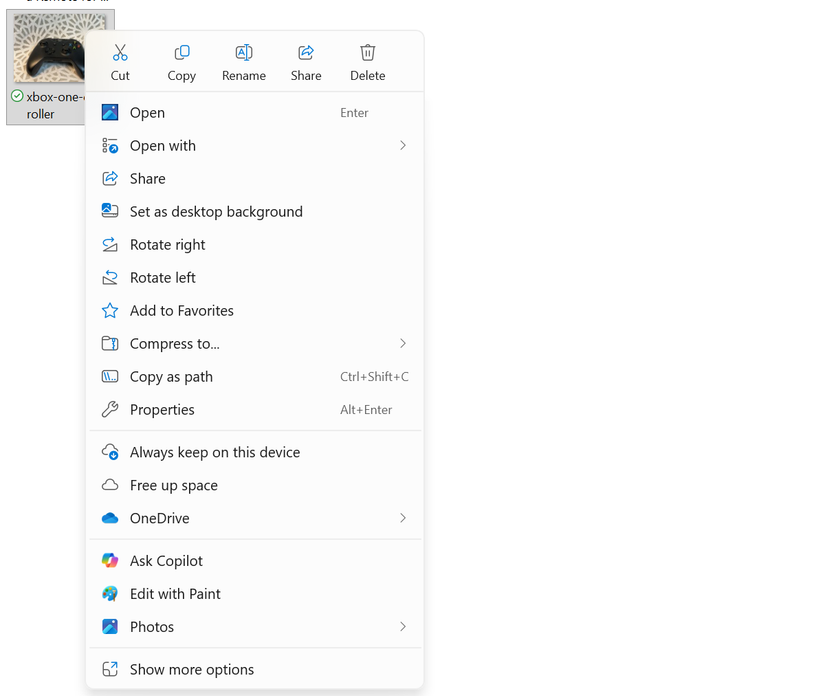
I tried to live with it, but I decided it wasn’t worth it. If there are things, even small things, that I can do to improve my productivity, I want to do them, because they add up. The good news here is that there are a few ways to bring back the full context menu. The hack I’m using is simple to enable, and if necessary, disable. So, if you’re annoyed by the Windows 11 context menu like I am, read on.
[mai mult...]