OS - Windows

Personalizare sistem operare 275 Solutii

Optimizare pc 51 Solutii

Optimizare PC 106 Solutii

Scanare cu malwarebyte 4 Solutii

shareuire si mapare 15 Solutii

adaugare la domeniu 5 Solutii

Migrare profil 10 Solutii

instalare printer 50 Solutii

Instalare/reinnoire certificate 2 Solutii

Configureaza si verifica setarile de boot 12 Solutii

Transfer de date 21 Solutii

Configurare OS 109 Solutii

Reparare OS 48 Solutii

Punct de restaurare OS 8 Solutii

Windows Event Viewer 6 Solutii

Reinstalare/reconfigurare VPN 8 Solutii

Depanare VPN 4 Solutii

Optimizare client e-mail 12 Solutii

Optimizare PC 31 Solutii

Optimizare PC 20 Solutii

Reinstalare / Reconfigurare VPN 6 Solutii

Reinstalare OS 32 Solutii

Reparare sistem de operare 45 Solutii

Programare sistem operare 13 Solutii

Puncte de restaurare sistem de operare 14 Solutii

Instalare imprimanta 44 Solutii

Mapare si partajare 13 Solutii

Modificari firewall 12 Solutii

Migrare profil 8 Solutii

Transferuri de date 33 Solutii

Upgrade sistem operare 12 Solutii

Windows Event Viewer 7 Solutii

Verificare HDD 32 Solutii

Spatiu partitie 31 Solutii

Scanare cu MalwareBytes 5 Solutii

Setari servicii sistem operare 43 Solutii

Setari retea sistem operare 25 Solutii

Setari partitii 19 Solutii

Actualizare sistem operare 15 Solutii

Clonare HDD 11 Solutii

Compatibilitate program 13 Solutii

Instalare / Reinnoire Certificate 6 Solutii

Configurare si verificare setari de BOOT 15 Solutii

Configurare Sistem de operare 1485 Solutii

Identificare DLL-uri lipsa 2 Solutii

Depanare 1094 Solutii

Editarea politicilor de grup ale sistemului de operare 13 Solutii

Drivere 50 Solutii

How To Add Cloud Storage To File Explorer on Windows 10/11

Cloud storage is a type of online storage that allows you to store data and access it from any device connected to the internet. This can be useful for backing up files, collaborating on projects, accessing important documents while you’re away from home or work, and more.

There are a variety of cloud storage options available, including Dropbox, Google Drive, and OneDrive. Each one offers different features and levels of security, so it’s important to choose the right option based on your specific needs. To ensure your cloud files are always within reach, you can integrate your cloud storage into File Explorer on both Windows 10 and Windows 11. This gives easy access to anything in your cloud drive so you can quickly open and edit your files and share them with others.

[mai mult...]

How to edit a signature in Outlook – Windows

  • Open Outlook and click New Email on the Home tab.
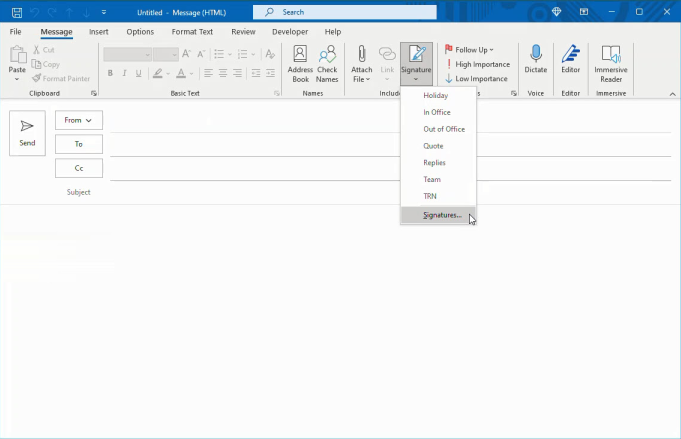
  • In the compose window that opens, go to the Message tab.
  • Select the arrow below Signatures and choose Signatures.

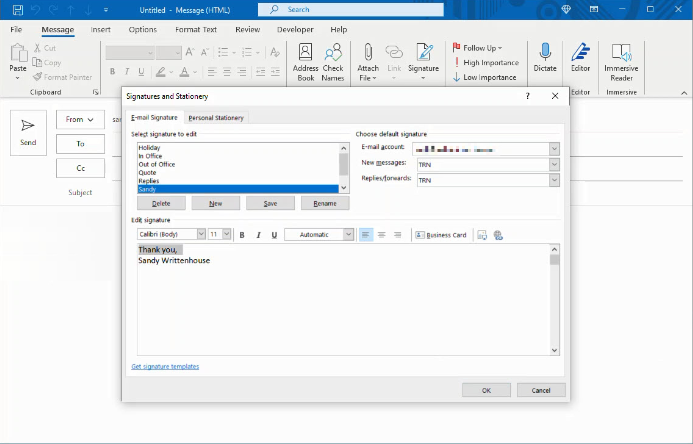
  • In the subsequent pop-up window, pick the signature on the top left that you want to edit.
  • Make your edits directly in the editor box that displays the current signature.

  • Click Save to preserve your changes.
  • When you finish, click OK to close the window.
[mai mult...]

How to add a desktop in Windows 11

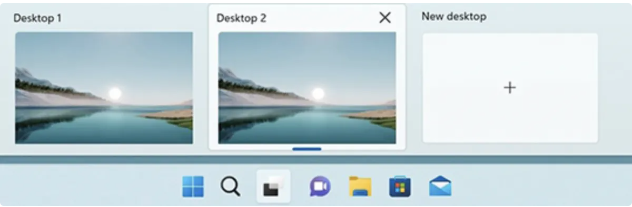
  • To add a virtual desktop, open up the new Task View pane by clicking the Task View button (two overlapping black and white rectangles) on the taskbar, or by pressing the Windows Key + Tab.
  • If you don’t see the Task View button in your taskbar, right click the taskbar and click Taskbar settings. Then go to Task View and toggle the switch to On.
  • Now, in the Task View pane, click New desktop to add a virtual desktop. The “Add a desktop” button will appear as a gray tile with a plus symbol. Click that tile for your new desktop.
  • You can also quickly add a desktop without entering the Task View pane by using the keyboard shortcut Windows Key + Ctrl + D.
[mai mult...]