OS - Windows

Personalizare sistem operare 275 Solutii

Optimizare pc 51 Solutii

Optimizare PC 106 Solutii

Scanare cu malwarebyte 4 Solutii

shareuire si mapare 15 Solutii

adaugare la domeniu 5 Solutii

Migrare profil 10 Solutii

instalare printer 50 Solutii

Instalare/reinnoire certificate 2 Solutii

Configureaza si verifica setarile de boot 12 Solutii

Transfer de date 21 Solutii

Configurare OS 109 Solutii

Reparare OS 48 Solutii

Punct de restaurare OS 8 Solutii

Windows Event Viewer 6 Solutii

Reinstalare/reconfigurare VPN 8 Solutii

Depanare VPN 4 Solutii

Optimizare client e-mail 12 Solutii

Optimizare PC 31 Solutii

Optimizare PC 20 Solutii

Reinstalare / Reconfigurare VPN 6 Solutii

Reinstalare OS 32 Solutii

Reparare sistem de operare 45 Solutii

Programare sistem operare 13 Solutii

Puncte de restaurare sistem de operare 14 Solutii

Instalare imprimanta 44 Solutii

Mapare si partajare 13 Solutii

Modificari firewall 12 Solutii

Migrare profil 8 Solutii

Transferuri de date 33 Solutii

Upgrade sistem operare 12 Solutii

Windows Event Viewer 7 Solutii

Verificare HDD 32 Solutii

Spatiu partitie 31 Solutii

Scanare cu MalwareBytes 5 Solutii

Setari servicii sistem operare 43 Solutii

Setari retea sistem operare 25 Solutii

Setari partitii 19 Solutii

Actualizare sistem operare 15 Solutii

Clonare HDD 11 Solutii

Compatibilitate program 13 Solutii

Instalare / Reinnoire Certificate 6 Solutii

Configurare si verificare setari de BOOT 15 Solutii

Configurare Sistem de operare 1485 Solutii

Identificare DLL-uri lipsa 2 Solutii

Depanare 1094 Solutii

Editarea politicilor de grup ale sistemului de operare 13 Solutii

Drivere 50 Solutii

How to Check Your Java Version on Windows 11

There are plenty of ways to determine what version of Java you have installed, whether you’re using Windows 11 or Windows 10. For example, you can usually enter “About Java” in the Start Menu search and click the result to get a Java version. But that doesn’t always display the version your system will actually try to use if you run a JAR file.

[mai mult...]

How to use the old photo viewer in Windows 11

If you are frustrated with the slow and laggy Photos app on Windows 11, worry not. You can still get the trusty Windows Photo Viewer right from Windows 7 to Windows 11. I am sure it will quickly become the best photo viewer on Windows 11 for you. So go ahead and try this registry hack on your Windows 11 PC.

[mai mult...]

3 Usefull CMD commands

First, open CMD as administrator

1.Ipconfig/displaydns

It will show every recent connections to the web pages that you visited,including incognito ones,ipconfig/flushdns will delete the history.

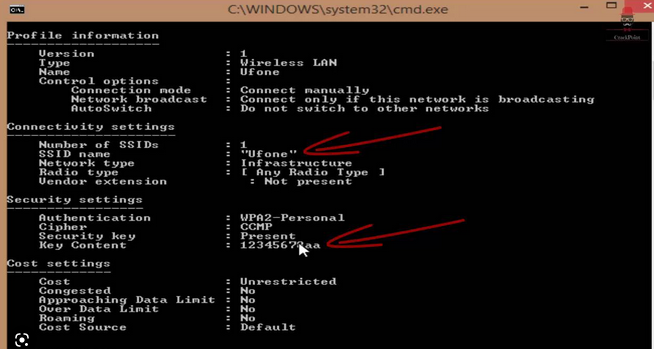
2.netsh wlan show profiles will show every lan your pc connected to

netsh wlan show profiles followed by the connection name + “key=clear” will also show the password key

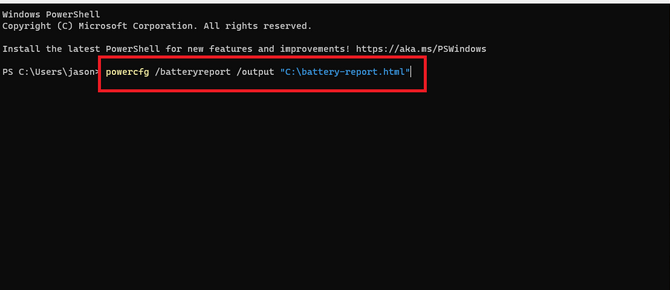
3.powercfg /batteryreport will generate informations about your laptops battery that will open with any browser.

[mai mult...]