Serviciul de backup FileHistory nu poate fi activat
Serviciul de backup FileHistory nu poate fi activat
[mai mult...]
Soluții pentru problemele tale IT
Serviciul de backup FileHistory nu poate fi activat
[mai mult...]Cryptolocker Removal. If you’re reading this article then chances are you’ve been browsing on the internet only to discover you browser has suddenly crashed, and a message with a red background has appeared on your screen which says your personal files are now encrypted, and if you don’t pay 300 dollars within 72 hours or 3 days, you’ve lost them forever. Yep, this is the beginning of the dreaded Cryptolocker virus ransomware that is taking many a PC user for a ride. While there’s good news and bad news concerning the Crypto locker virus, the good news is, there is a way to remove the virus and restore your files without paying the ransom. Keep reading to find out how.
So how exactly does Cryptolocker virus work, and how did you manage to become infected with the malware? Basically, CryptoLocker is a ransomware program that encrypts certain files on your computer using a mixture of RSA & AES encryption. When it has finished encrypting your files, it will display the Crypto Locker payment program information (red screen). How did you manage to get Cryptolocker virus on your copter to begin with? There’s a pretty good chance if you became infected with the Crypto locker ransomware, it came to you in the form of a phishing email. Basically, one of these emails is a message that looks somewhat official and with it is some kind of attachment. It may be a .pdf or look like a scanned document of some kind. Once the attachment is opened, Cryptolocker virus begins its dirty work.
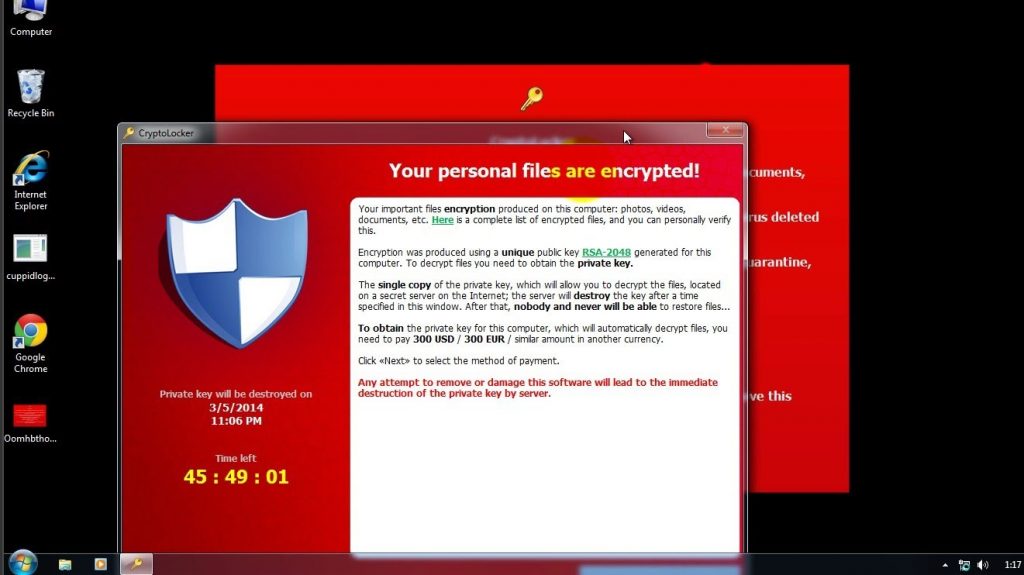
Once Cryptolocker virus has made it’s way to your computer, it begins to targets files with the following extensions:
*.odt, *.ods, *.odp, *.odm, *.odc, *.odb, *.doc, *.docx, *.docm, *.wps, *.xls, *.xlsx, *.xlsm, *.xlsb, *.xlk, *.ppt, *.pptx, *.pptm, *.mdb, *.accdb, *.pst, *.dwg, *.dxf, *.dxg, *.wpd, *.rtf, *.wb2, *.mdf, *.dbf, *.psd, *.pdd, *.pdf, *.eps, *.ai, *.indd, *.cdr, *.jpg, *.jpe, img_*.jpg, *.dng, *.3fr, *.arw, *.srf, *.sr2, *.bay, *.crw, *.cr2, *.dcr, *.kdc, *.erf, *.mef, *.mrw, *.nef, *.nrw, *.orf, *.raf, *.raw, *.rwl, *.rw2, *.r3d, *.ptx, *.pef, *.srw, *.x3f, *.der, *.cer, *.crt, *.pem, *.pfx, *.p12, *.p7b, *.p7c
For those who don’t know much about computers, files like .doc or .docx would be your word documents, while .jpg and .img target your photos, just to name a few of the files which are being attacked. When Cryptolocker ransomware finds files with these extensions, it encrypts them using a public key and then makes a record of the file in the Windows registry under HKEY_CURRENT_USERSoftwareCryptoLockerFiles. After all the encryption competes, you then get the dreaded red screen demanding the malware removal ransom. Although payment will result in decryption of your files, many professionals are suggesting you not pay the fines right away as there are other free ways to remove the virus and restore your files. Here’s how.
[mai mult...]Cum sa inserezi un PDF intr-un fisier Word.
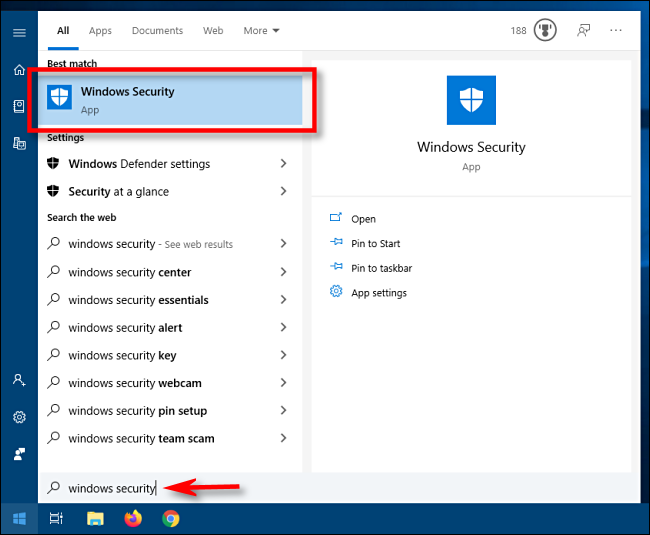
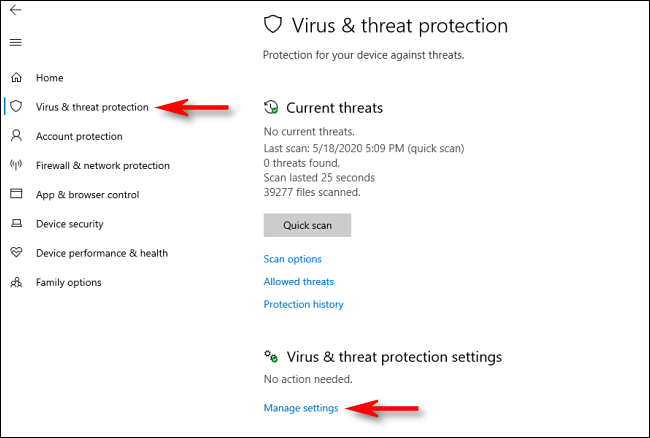
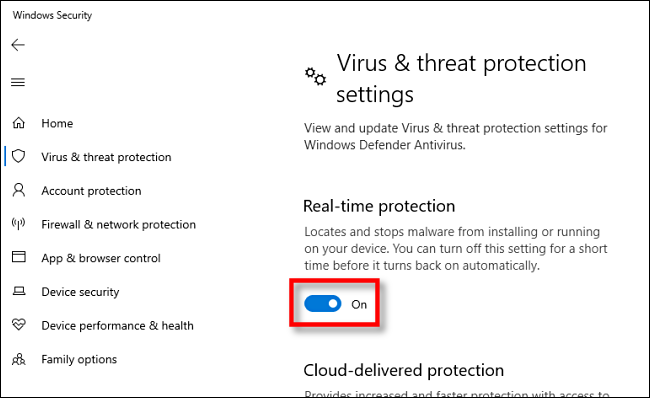
[mai mult...]Urmati acest tutorial doar daca stiti ce faceti, oprind protectia in timp real va expuneti la riscuri.
The text cursor indicator adds a splash of color to your text cursor, making it easier to find in a sea of text.
[mai mult...]Magnifier, the screen-magnifying feature that comes with Windows 10, can also read text aloud.
[mai mult...]