
OS - Windows
Personalizare sistem operare 275 Solutii
Optimizare pc 51 Solutii
Optimizare PC 106 Solutii
Scanare cu malwarebyte 4 Solutii
shareuire si mapare 15 Solutii
adaugare la domeniu 5 Solutii
Migrare profil 10 Solutii
instalare printer 50 Solutii
Instalare/reinnoire certificate 2 Solutii
Configureaza si verifica setarile de boot 12 Solutii
Transfer de date 21 Solutii
Configurare OS 109 Solutii
Reparare OS 48 Solutii
Punct de restaurare OS 8 Solutii
Windows Event Viewer 6 Solutii
Reinstalare/reconfigurare VPN 8 Solutii
Depanare VPN 4 Solutii
Optimizare client e-mail 12 Solutii
Optimizare PC 31 Solutii
Optimizare PC 20 Solutii
Reinstalare / Reconfigurare VPN 6 Solutii
Reinstalare OS 32 Solutii
Reparare sistem de operare 45 Solutii
Programare sistem operare 13 Solutii
Puncte de restaurare sistem de operare 14 Solutii
Instalare imprimanta 44 Solutii
Mapare si partajare 13 Solutii
Modificari firewall 12 Solutii
Migrare profil 8 Solutii
Transferuri de date 33 Solutii
Upgrade sistem operare 12 Solutii
Windows Event Viewer 7 Solutii
Verificare HDD 32 Solutii
Spatiu partitie 31 Solutii
Scanare cu MalwareBytes 5 Solutii
Setari servicii sistem operare 43 Solutii
Setari retea sistem operare 25 Solutii
Setari partitii 19 Solutii
Actualizare sistem operare 15 Solutii
Clonare HDD 11 Solutii
Compatibilitate program 13 Solutii
Instalare / Reinnoire Certificate 6 Solutii
Configurare si verificare setari de BOOT 15 Solutii
Configurare Sistem de operare 1485 Solutii
Identificare DLL-uri lipsa 2 Solutii
Depanare 1094 Solutii
Editarea politicilor de grup ale sistemului de operare 13 Solutii
Drivere 50 Solutii
Upgrade Firmware PS4 prin USB
Ne aflam in situatia in care secventa de boot a consolei este corupta in urma unei erori sau a inlocuirii hardului si avem nevoie sa facem un upgrade la ultima versiune de firmware a consolei pentru a putea remedia toate problemele.
[mai mult...]Cum căutăm cu Bing în noul Notepad
În caz că avem nevoie rapid să cautăm o secvență dintr-un text în Notepad, această funcție este folositoare și practică.
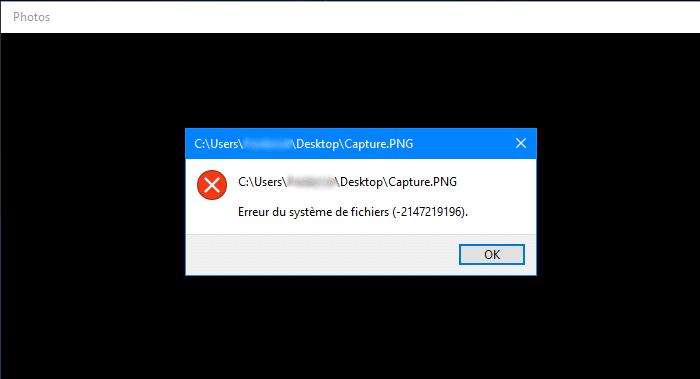
[mai mult...]File System Error (-2147219196) – Can’t open photos
Eroarea este intampinata la accesarea imaginilor in windows photos.
Rezolvare eroare Microsoft Store – Windows 8/8.1
Windows Store nu poate fi accesat.

How to increase dedicated Video RAM in Windows 10
The computer memory plays a vital role in having quick access to applications and programs. The computer memory or RAM is used by the system processor to store the data. It is a volatile memory on a motherboard that stores the system’s operating system and programs for quick access. Your system processor continuously loads the data from the hard disk to the RAM before execution. But sometimes you may need to buffer a high-quality video, video editors, 3D structures and new game on your PC.
What is dedicated VRAM
Graphics-intensive applications and programs use a large space of system memory for rendering graphical data with high quality, color, clarity, and definition to the display. In these cases, your system may fall into a shortage of RAM and struggle to buffer high intensive graphics programs, as your graphics card shares the system memory. Unless you need to buffer high-end video applications, your PC works normally with the RAM. Otherwise, to buffer the high-quality visual display to your system monitor, you will require a special type of memory called Video RAM (VRAM).
The Video RAM is dedicated for a special purpose to process high-intensity video faster than the system RAM. Graphics cards or GPU use Video RAM (VRAM) built on it to store the images and video data. VRAM is also called as virtual RAM and is used as the GPU memory for easily processing graphical applications, games, complex textures and 3D graphics.
However, some applications like the latest games and videos may require you to play videos at 1080p or 4k resolution that needs plenty of VRAM. Moreover, the VRAM processes more pixels for higher resolution images to display them better. That being said, The modern games require increased detailing and the exact system requirements to launch them on your system monitor and, having an insufficient VRAM will lead to a heavy overload of GPU.
[mai mult...]