Poster printing (Windows) for Brother DCP-T510W
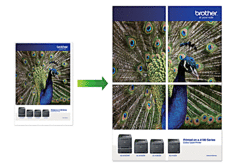
Increase the print size and print the document in the display print mode.

Soluții pentru problemele tale IT
Increase the print size and print the document in the display print mode.
In principle, Brother equipment is designed to stop ALL printing operations when any of the ink tanks are empty. This happens to protect the print head and maintain good print quality. If the machine continues to print, print jobs and cleaning cycles will damage the print head.
However, Brother equipment can work exceptionally in B&W (monochrome) print-only mode when one or more ink tanks are used up. When a tank runs out of ink, the following B&W Print Only Refill Ink error message will appear on the equipment display (LCD).
[mai mult...]In principle, Brother equipment is designed to stop ALL printing operations when any of the ink tanks are empty. This happens to protect the print head and maintain good print quality. If the machine continues to print, print jobs and cleaning cycles will damage the print head.
However, Brother equipment can work exceptionally in B&W (monochrome) print-only mode when one or more ink tanks are used up. When a tank runs out of ink, the following B&W Print Only Refill Ink error message will appear on the equipment display (LCD).
[mai mult...]If the printed text becomes blurry or the images become blurred after transporting the machine, adjust the print alignment.
[mai mult...]Solve the problem when you can’t type in Windows search.
[mai mult...]
Microsoft AutoUpdate makes sure your copy of Office will always be up-to-date with the latest security fixes and improvements. If you are a Microsoft 365 subscriber, you’ll also receive the newest features and tools.
[mai mult...]